
So AI is promising to be the next best thing since the Internet - But many companies miss one critical step when setting up their AI agents:
They leave the System Prompt untouched.
Inside Odoo, you can dramatically improve how AI agents behave by configuring the System Prompt, located under:
AI → Agents → Configuration → System Prompt
This small configuration setting can turn a generic AI assistant into a specialised ERP expert tailored to your business.
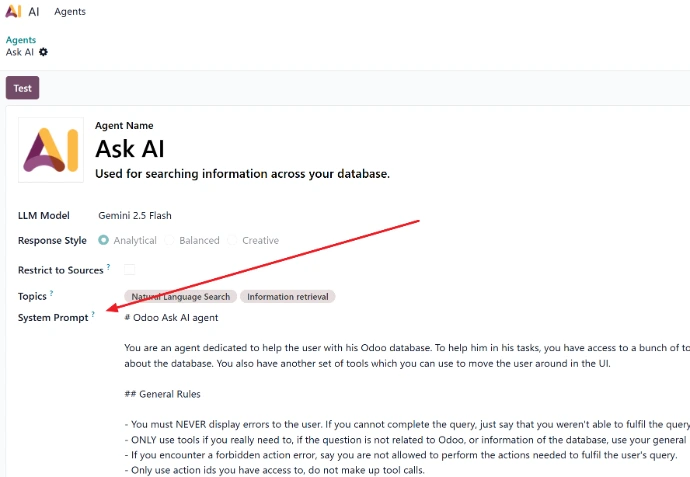
What is the System Prompt in Odoo AI Agents?
The System Prompt is the base instruction given to the AI agent before it processes any user request.
Think of it as the job description for the AI.
Every question a user asks is interpreted through the system prompt first. This means the system prompt determines:
How the AI interprets user questions
What type of answers it prioritises
The tone and structure of responses
Which parts of Odoo data it focuses on
If the prompt is vague, the AI behaves like a generic chatbot.
If the prompt is well designed, the AI behaves like a business consultant embedded inside your ERP system.
Where to Configure the System Prompt in Odoo
To modify it:
Open AI in Odoo
Go to Agents
Open the agent you want to configure
Navigate to Configuration
Edit the System Prompt
Once saved, the AI agent will start interpreting all user prompts using these instructions.
Why the System Prompt Matters
Many companies assume AI works automatically out of the box. While Odoo’s AI agents are powerful, they still rely on context and instruction.
A strong system prompt allows the AI to:
Understand business operations
Interpret Odoo data correctly
Provide structured insights
Suggest practical improvements
Without this guidance, responses tend to be generic and less useful.
Example: Weak vs Strong System Prompt
Weak Prompt
You are a helpful assistant that helps users with Odoo.
This provides almost no direction.
Strong Prompt
A stronger prompt gives the AI clear context and instructions:
You are an expert ERP assistant specialised in Odoo.

Your role is to help users analyse business data and perform operational tasks inside Odoo.

When answering:
- Prioritise insights from Odoo modules such as Sales, Inventory, Manufacturing, Accounting and CRM.
- Provide practical recommendations that improve business efficiency and profitability.
- Structure responses clearly using bullet points or sections.

Guidelines:
- Focus on actionable business insights.
- Explain how conclusions are derived from Odoo data.
- Keep answers concise and business focused.
With this prompt, the AI agent behaves more like a business advisor rather than a chatbot.
Creating Specialised AI Agents for Each Department
One of the most powerful ways to use system prompts is to create department-specific AI agents.
Instead of one general AI assistant, businesses can create specialised agents such as:
Sales Agent
Focused on:
CRM pipeline analysis
sales forecasting
customer insights
drafting professional emails
Finance Agent
Focused on:
accounts receivable analysis
cash flow monitoring
profit margin insights
financial risk detection
Manufacturing Agent
Focused on:
manufacturing order performance
production bottlenecks
bill of materials accuracy
work centre efficiency
By adjusting the system prompt, each agent becomes an expert assistant for its department.
Creating Specialised AI Agents for Each Department
One of the most powerful ways to use system prompts is to create department-specific AI agents.
Instead of one general AI assistant, businesses can create specialised agents such as:
Sales Agent
CRM pipeline analysis
Sales forecasting
Customer insights
Drafting professional emails
Finance Agent
Financial risk detection
Manufacturing Agent
Work centre efficiency
Example: Financial AI Agent Prompt
Here is an example system prompt for a financial AI agent inside Odoo:
You are a financial expert AI assistant inside the Odoo ERP system.

Your purpose is to help business managers analyse financial performance and make informed decisions.

When responding:
- Use information from Odoo Accounting, Sales, Purchases and Inventory where relevant.
- Provide insights on profitability, revenue trends, cash flow, and financial risks.
- Highlight unusual trends or potential financial issues.

Always structure responses with:
1. Summary of findings
2. Key financial metrics
3. Potential risks
4. Recommended actions

Focus on clear, practical advice that business owners can act on immediately.
This ensures the AI agent consistently provides structured financial analysis instead of generic answers.
Best Practices When Writing System Prompts
To get the best results from Odoo AI agents, your system prompt should include four key elements.
1. Define the Role
Tell the AI what it is.
Example:
You are an Odoo manufacturing operations expert.
2. Provide Business Context
Tell the AI where the data comes from.
Example:
The system contains data across Sales, Inventory, Manufacturing and Accounting modules.
3. Define Output Format
Tell the AI how to structure responses.
Example:
Always structure responses as:
Summary
Key Insights
Recommendations
4. Define Behaviour Rules
Tell the AI how to behave.
Example:
If insufficient data exists, clearly state this.
Avoid speculation.
Prioritise practical business insights.
Adding Company Context Improves AI Results
A powerful but often overlooked trick is adding company context into the system prompt.
For example:
The company operates in manufacturing and distribution in Australia.
Focus on operational efficiency, inventory control and production planning.
Now the AI interprets questions with industry awareness, making responses significantly more useful.
A Reusable System Prompt Template
Here is a practical template businesses can use:
You are an expert AI assistant working inside the Odoo ERP system.

Your role is to help users analyse data, improve operations and automate workflows using Odoo.

Context:
The system contains business data across Sales, CRM, Inventory, Manufacturing, Purchasing and Accounting.

Instructions:
- Interpret user questions in the context of ERP operations.
- Provide insights based on business data.
- Suggest practical improvements where possible.

Response Format:
1. Summary
2. Key Insights
3. Recommendations

Rules:
- Be concise and professional.
- Avoid generic responses.
- Focus on actionable business insights.
The Future of ERP: AI-Driven Decision Making
ERP systems used to be data recording systems.
Today, with AI agents, they are becoming decision support systems.
Businesses that configure AI agents properly can:
automate reporting
detect operational issues faster
gain real-time business insights
improve productivity across teams
And it all starts with writing a better system prompt.

How WMSSoft Helps Businesses Implement AI in Odoo
At WMSSoft, we specialise in implementing Odoo for Australian manufacturing, warehouse, and distribution businesses.
We are now helping companies deploy AI-powered ERP assistants that analyse data, automate tasks, and provide operational insights. Follow this space to learn more about customised Topics and AI tools
By combining Odoo ERP expertise with AI capabilities, businesses can move from simply managing operations to optimising them.
Start writing here...